1 · Drinks-led menu pages
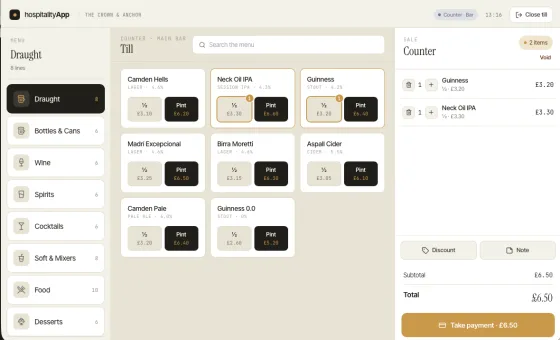
Categories that match a bar's brain — Draught, Bottles & Cans, Wine, Spirits, Cocktails, Soft & Mixers. Half and pint pricing on one card, not buried in a sub-menu.

A till app built for pubs, bars, restaurants and cafés — drinks-led menus, allergen prompts, integrated takings, no monthly hardware fees. Inside the same app as your rota and compliance file.
A hospitality POS — point of sale — is the software bar and waiting staff use to take orders, send them to the kitchen or bar, take payment and record the sale. Some people call it an EPOS (electronic point of sale), some call it a till app. Same thing.
What makes a hospitality POS different from a generic retail till is the rhythm of the work it has to handle: drinks-led menus with half-pint and pint pricing, course management for restaurants, allergen prompts at the moment of order, split-bill payments, table service, refusal logs for licensed premises. A till built for clothing retail won't survive a Saturday night in a busy pub.
If your current till is missing three or more of these, it wasn't built for the job.
Categories that match a bar's brain — Draught, Bottles & Cans, Wine, Spirits, Cocktails, Soft & Mixers. Half and pint pricing on one card, not buried in a sub-menu.
For restaurants — starters fire to the pass, mains hold, desserts on demand. Kitchen sees what's ordered and what's pending.
Server taps an item that contains nuts, the till prompts: "Has the guest confirmed no allergy?" Natasha's-Law ready, server-trained-and-logged.
Split evenly, split by item, split by seat. Bar staff don't open a calculator. Service flows; tips don't get awkward.
Bar staff hit "Refused — under-25 no ID" without leaving the till. Licensing log builds itself; test-purchase season stays calm.
Works with Stripe, SumUp, Square, Zettle or your existing standalone terminal. The till records the sale; the processor takes the card.
Staff discount, NHS rate, comp drinks — applied at line or whole-bill level, logged with reason, exportable for the owner's review.
Every sale feeds the daily takings total, which feeds the labour-cost %, which feeds the payroll export. No re-keying, no end-of-week reconciliation.
Setup picks your venue type; the till's layout, default menu structure and compliance prompts change automatically.
Default landing page is Draught. Half + pint pricing on the same card. Cellar checks accessible from a side button. Refusal log one tap away. Sports-event "second-screen" mode shows tab management for crowded fixtures. The Crown & Anchor screenshot above is the till in pub mode.
Default landing is your tables, with seat covers and pay-per-table; the visual floor plan comes with Complete Plus. Courses fire in waves (starter → main → dessert) with kitchen printer routing. Allergen prompt is mandatory before the order sends. Split-bill flow is built for the "we'll split the wine but I had the steak" reality.
Default landing is Coffee + Pastries. Modifiers (oat milk, extra shot, decaf) chain in three taps. Fast tab management for the morning rush. PPDS labels print at the till if a label printer is connected.
Default landing is Cocktails. Spec-card per cocktail visible to staff (recipe + glassware). Pre-mix vs made-to-order flagged. Door-staff handover at close-time runs through the till. Late-night refreshment evidence pack builds itself.
The published prices for hospitality POS in the UK look reasonable — until you add the per-terminal fee, the integration fee and the support fee. Here's what you're actually buying.
£45–£89/mo software + £400–£1,200 per terminal (or £15–£40/mo lease) + integration fees + card-processor lock-in. Industry standard for groups; expensive overhead for independents.
£20–£75/mo + tablet you provide + their card processor (locked in). Cheaper at sticker price; doesn't talk to your rota or compliance system. Two tools, two bills, two sources of truth.
£149/venue/mo Complete includes till + printed kitchen tickets + stock + rota + full compliance + payroll reports. Bring any iPad, Android tablet or Windows 10/11 (64-bit) EPOS terminal — no per-terminal fees. Processor-agnostic.
Prices ex-VAT, accurate June 2026; verify with each provider. The biggest cost most independents overlook isn't the till hardware — it's the integration tax of running rota, compliance and till on three separate systems. Annual billing on any tier saves you two months. See full pricing.
Software for taking orders, sending them to the kitchen or bar, taking payment and recording the sale — built for the rhythms of pubs, restaurants and cafés (drinks-led menus, course management, allergens, split bills, refusal logs).
Typically £30–£90 per till per month for software, £400–£1,200 per terminal for hardware (or £15–£40 per month leased), plus 1.0–1.7% card-processing fees. Hospitality App includes the till on the Complete plan at £149/venue/mo. No per-terminal fees; bring any iPad or Android tablet, or run it on a Windows 10 or 11 (64-bit) PC or EPOS terminal.
All-in-one platforms like Hospitality App run the till inside the same app as rota, compliance and payroll reports. Staff records, allergen matrices and labour-cost calculations stay in sync without an integration layer.
Same engine, different modes. Pub mode leads with Draught and half/pint pricing; restaurant mode leads with course management and allergen sign-off at the till; café mode leads with modifier-heavy fast service.
Yes — Hospitality App's till is processor-agnostic. Works with Stripe, SumUp, Square, Zettle (where allowed) and standalone terminals. Keep your existing card machine and contract.
Yes. Hospitality App Till for Windows runs on Windows 10 or 11 (64-bit) — a touchscreen EPOS terminal, an all-in-one POS PC or an ordinary Windows PC you already own. Same till as on tablets, shown full screen: it starts with Windows, stays on the till, and staff use their till PIN as normal. It prints receipts and opens the cash drawer through a receipt printer plugged into the PC or on your network. No per-terminal or licence fee for adding a Windows till.
The till holds the allergen matrix per menu item and prompts the server before order send. For PPDS labelling it drives a label printer or hands off to your existing labelling system. Allergen data lives in one place.
Coming soon — the pub-specific guide to till setup, cellar tie-in and refusal-log workflow.
For pubs overviewComing soon — one menu, every channel. Till, dine-in, takeaway; allergen matrix stays in sync.
Food hygiene overviewRefusal log, Challenge 25, DPS notice — what the licensing officer asks for, made digital.
Read the guideOur full UK comparison: what each system actually costs, what you are signing, who owns your card processing, and which of them include a rota, clock-in, payroll or compliance at all.
Sign up free, set up your menu, take your first sale. If it doesn't beat what you're using now in a week, walk away.
Start free trial